
E-Solution Manual Overview
The EducoSoft E-Solution Manual is a valuable digital resource designed to assist both students and instructors. It provides detailed solutions to exercises and problems from the course materials, helping students check their work and deepen their understanding. Instructors can also use it to guide students through complex problems. The E-Solution Manual is accessible digitally and can be printed for offline use.
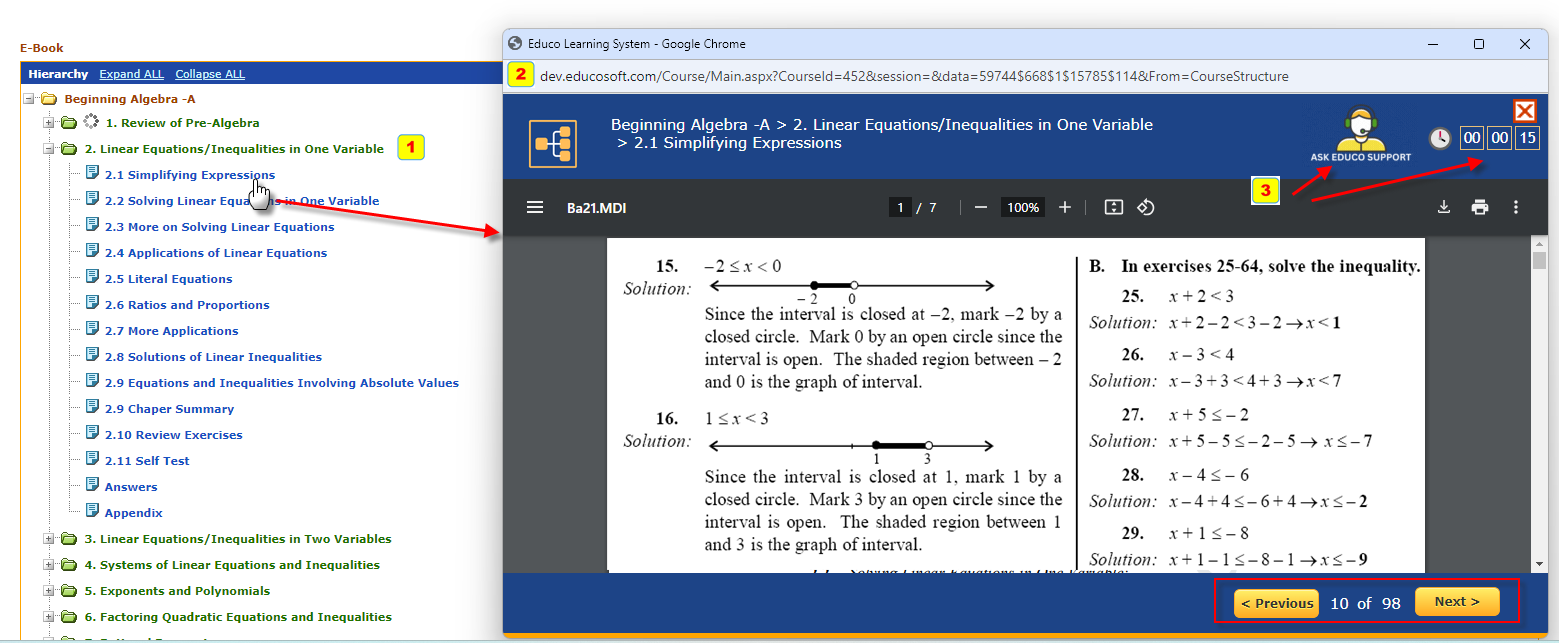
1. Course Hierarchy:
- The course content is hierarchical, making navigating between chapters and sections easy.
- Chapter Folders: Each major topic is divided into smaller sections, organized in expandable and collapsible folders.
- Section Titles:
- Users can quickly go to different sections by clicking on the desired title, as indicated by the cursor in the screenshot.
2. E-SM Viewer:
- Click on the Section Title to access the main reading area, where the content of the selected section is displayed.
- Title & Content: The title of the current chapter is shown.
- Navigation Controls:
- Previous/Next Buttons: Located at the bottom right of the panel, these buttons allow users to flip through pages sequentially.
- Page Information: The user can see their current page for tracking progress.
- Zoom, Print, and Download Options: These icons at the top of the viewer allow users to zoom in, print, or download pages as needed.
3. Additional Features:
- Support Access: In the top right corner is a button for quick access to Educo Support for any questions or technical assistance.
- Time Tracking: A visible timer tracks how long the student has been viewing the e-Solution Manual, for timed reading or session tracking.