
Activity Time Vs Grade Report
EducoSoft Activity Time Vs Grade Report is a tool used to analyze the relationship between the time students spend on various educo activities and their academic performance, measured by grades. Here's a step-by-step description of how this report works:
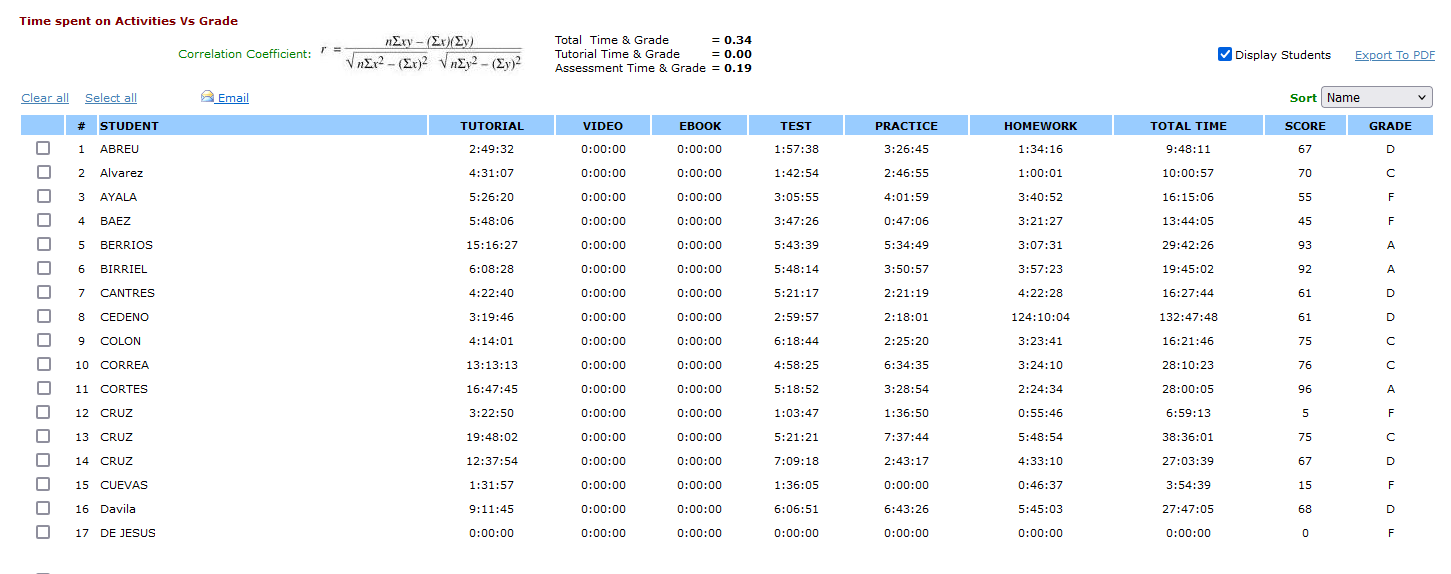
Report Data Summary:
- Student Data: The report collects data on individual students, including their names.
- Activity Data: It tracks the time students spend on different activities such as tutorials, videos, eBooks, tests, practice sessions, and homework.
- Performance Data: It records the scores and grades achieved by students in assessments and Tutorials.
Data Presentation:
- Columns: The report presents data in a tabular format with columns for each activity, total time spent, scores, and grades.
- STUDENT: Lists the names of the students.
- TUTORIAL, VIDEO, EBOOK, TEST, PRACTICE, HOMEWORK: Time spent (in hours : minutes : seconds) on each activity.
- TOTAL TIME: Sum of time spent on all activities.
- SCORE: The score achieved by the student.
- GRADE: The grade received by the student.
Correlation Analysis:
- Correlation Coefficient (r): The report calculates the correlation coefficient to measure the strength and direction of the relationship between time spent on activities and grades.
- Total Time & Grade: A correlation coefficient 0.34 indicates a moderate positive correlation.
- Assessment Time & Grade: A correlation coefficient 0.19 indicates a weak positive correlation.
- Tutorial Time & Grade: A correlation coefficient of 0.00 indicates no correlation.
Interpretation:
- Moderate Positive Correlation (r = 0.34): A moderate positive relationship exists between the total time spent on activities and grades. Students who spend more time on activities tend to have higher grades.
- Weak Positive Correlation (r = 0.19): A weak positive relationship exists between assessment time and grades. More time spent on assessments slightly correlates with better grades.
- No Correlation (r = 0.00): There is no correlation between tutorial time and grades, indicating that time spent on tutorials does not affect grades.
Usage:
- Identifying Trends: Instructors can use the report to identify trends and patterns in student behavior and performance.
- Targeted Intervention: By analyzing the data, Instructors scan target specific students or activities that may require additional support or intervention.
- Resource Allocation: The report helps in allocating resources effectively by understanding which activities contribute most to student success.
The "Time spent on Activities Vs Grade" report is a valuable tool for Instructors to gain insights into student behavior and performance. By analyzing the data, Instructors can make informed decisions to improve student outcomes and optimize the use of Educo resources.