
Announcement Overview
The EducoSoft Announcement feature allows users to create and send announcements. Here's a summary of the feature:
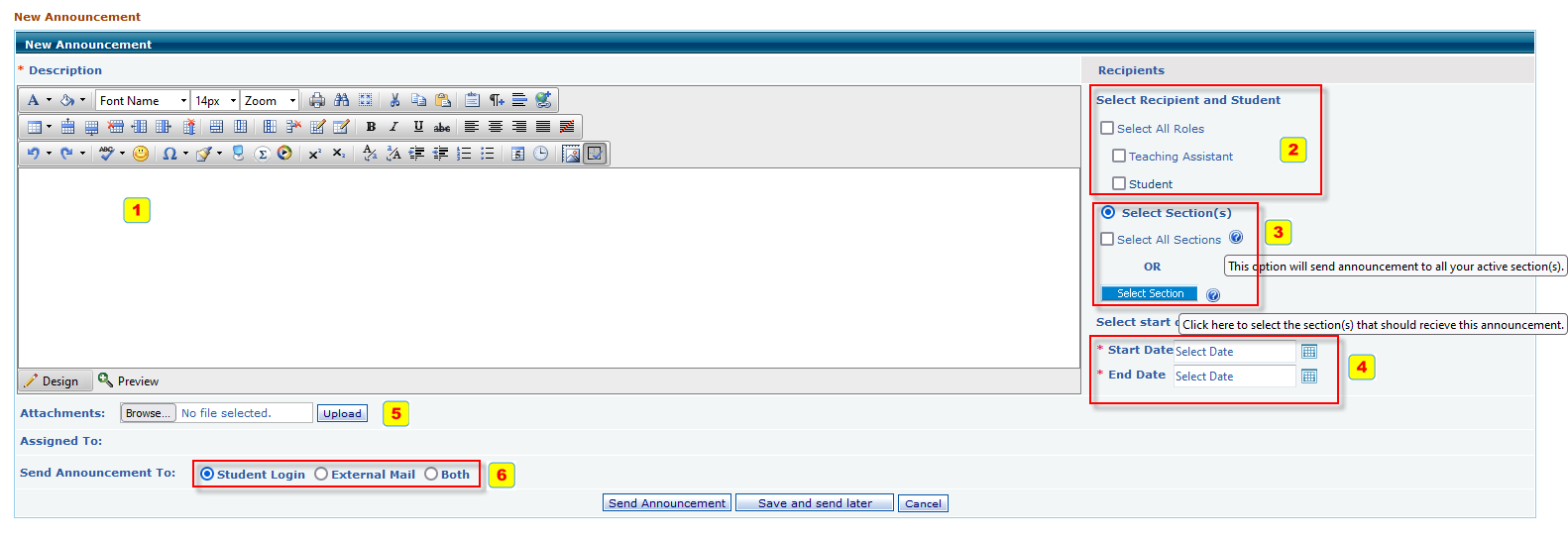
- Announcement Description: This section includes a text editor with options to format text (bold, italic, underline), change font and size, and insert elements like lists, links, images, or tables.
- Recipients Section: Users can choose recipients for the announcement, including:
- All Students
- Teaching Assistant
- All Instructors
- Specific Students
- There's also a "Select Section(s)" option, where users can pick specific sections and use a "Select Section" button.
- Date Settings: Users can set start and end dates for the announcement's availability.
- Attachments: Users can upload files to be included with the announcement.
- Assigned and Delivery Options: Options are available for sending announcements to the student login or external mail.
- Through the platform's login system.
- Via external email.
- Both methods for broader reach.