
Course Schedule Overview
EducoSoft Course Schedule is a feature that allows instructors to manage the access and availability of different chapters or lessons within a course. It provides a visual representation of the course structure, allowing teachers to easily activate or deactivate specific sections and assign specific time periods for student access.
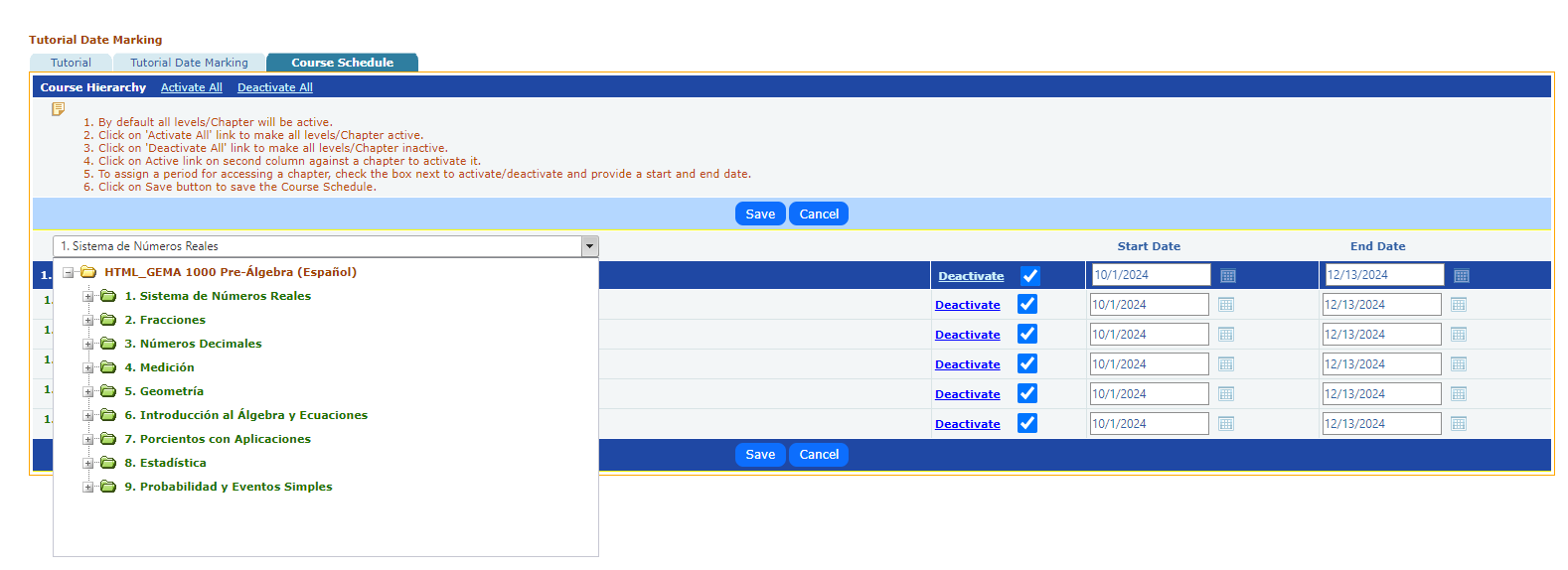
Key features of the EducoSoft Course Schedule:
- Course Hierarchy: The feature displays the course structure in a hierarchical format, making it easy to navigate and identify different levels and chapters.
- Activation/Deactivation: Teachers can easily activate or deactivate entire levels or individual chapters by clicking the corresponding links.
- Start and End Dates: Teachers can assign start and end dates to restrict access to specific chapters within a certain timeframe. This allows for the controlled release of content and prevents students from accessing material before they are ready.
- Saving Changes: Teachers can save the course schedule to ensure that the updated settings are applied once the desired changes have been made.
Benefits of using EducoSoft Course Schedule:
- Improved Organization: The visual representation of the course structure helps teachers organize and manage their content effectively.
- Flexible Access Control: Activating or deactivating chapters and assigning specific access periods provide flexibility in managing student learning.
- Enhanced Learning Experience: By controlling content release, teachers can create a more engaging and structured learning experience for their students.
- Time-Saving: The feature simplifies managing course content, saving teachers time and effort.