
Documents Overview
The EducoSoft Course Document feature enables instructors to upload and manage files (like PDFs, presentations, or worksheets) relevant to the course content. This allows students to access all necessary resources directly from the platform without searching for external materials.
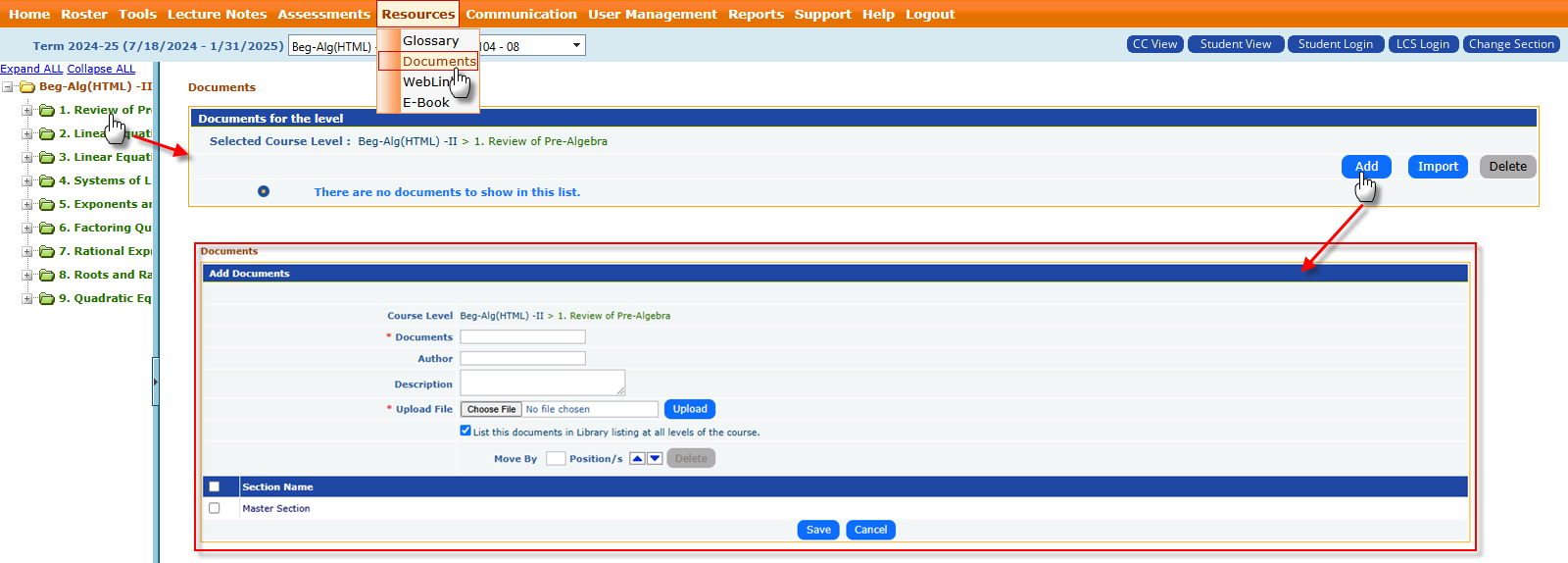
How to Upload and Manage Course Documents:
- Log in to EducoSoft and navigate to the relevant course.
- Go to the Resources and click on the Documents section.
- Select the appropriate course module or topic where you want to upload the document.
- Click “Add” or “Upload Document.”
- Enter the following information:
- Title: Name of the document (e.g., "Week 1 Lecture Notes").
- Description: Optional summary to describe the file content.
- Upload File: Select the document from your computer.
- Save the document to make it available.