
Weblink Overview
The EducoSoft Course Weblink allows instructors and students to access specific course-related resources through a direct, sharable link.
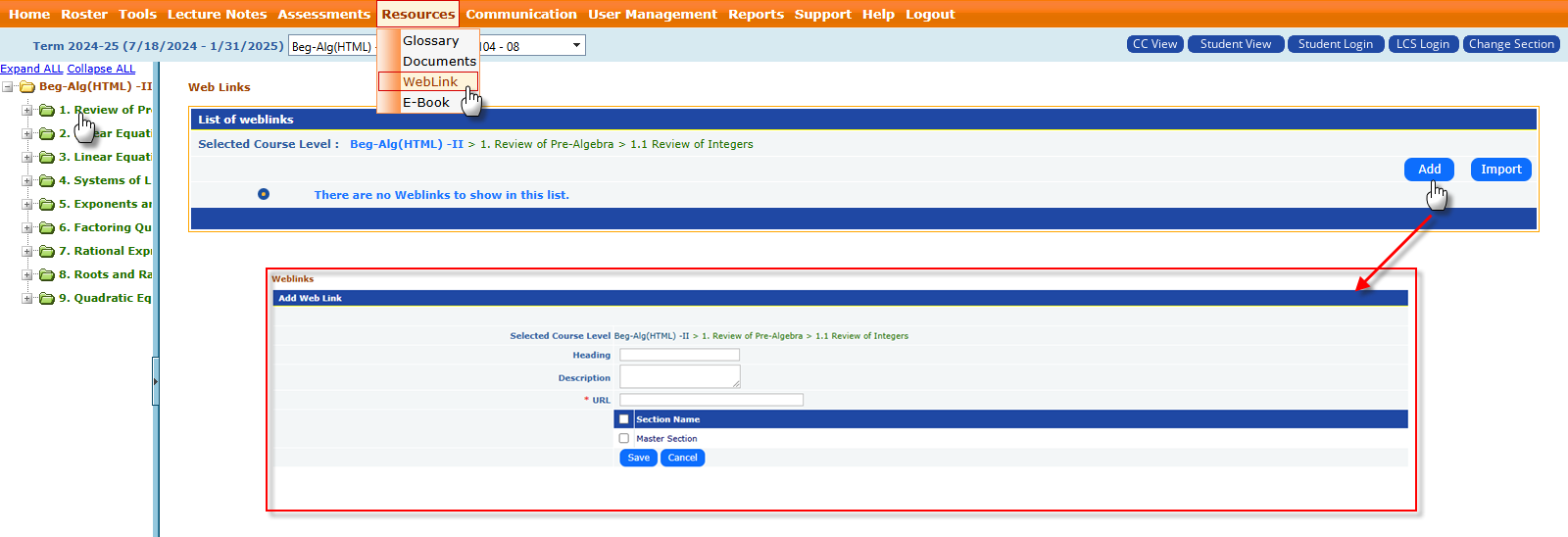
How to Add a Weblink:
- Click on the Chapter/Section Title.
- Click “Add” in the Web Links section.
- Enter the following details:
- Title: The name of the weblink (e.g., "Polynomials Video Tutorial").
- URL: The destination link (external resource or tool).
- Description: Optional – Add a short description of what the link is for.
- Click Save to make the weblink available.
How Students use Weblinks:
- Once added, students will see the weblinks when they log into the relevant section.
- By clicking on the link, students are taken directly to the specified resource, simplifying the access to essential materials.