
Adding Tutorial Credit Category
- Click on the "Add Tutorial Time" button:
- This button is located under the Grade Book Categories grid.
- It is only enabled if a Tutorial Time category does not already exist in the Grade Book.
- The system allows the creation of only one Tutorial Time category.

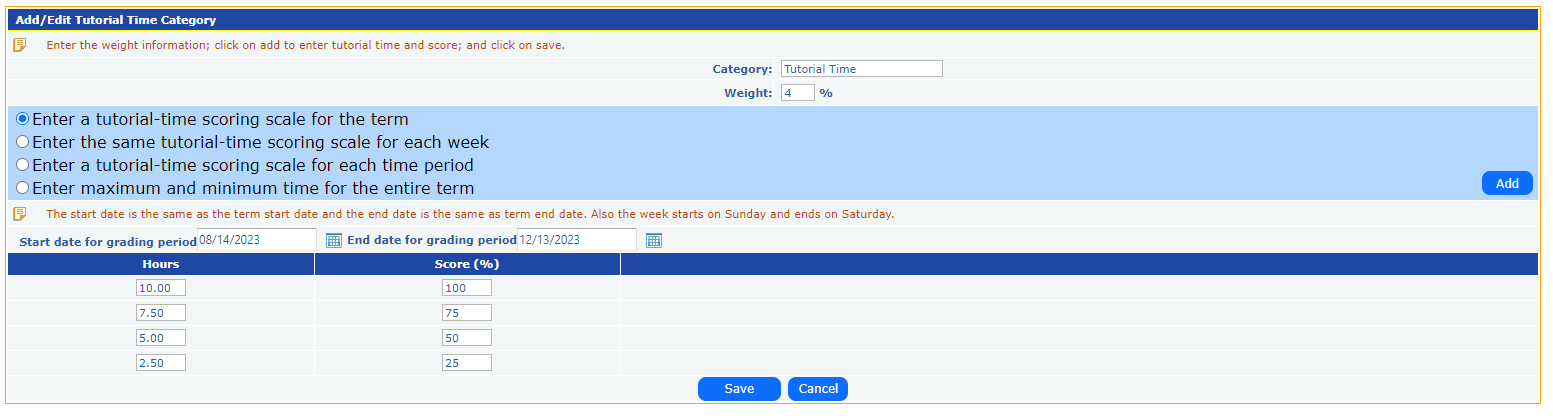
- Category Information:
- Category Name: This will typically default to "Tutorial Time."
- Weight (%): You can assign a specific weight to the tutorial time (e.g., 4% of the total grade).
- Scoring Scale Options: Instructors can select from one of the following options to define how tutorial time is scored:
- Enter a tutorial-time scoring scale for the term: This option allows you to enter a total score for tutorial time across the entire term.
- Enter the same tutorial-time scoring scale for each week: This option allows instructors to score tutorial time on a weekly basis.
- Enter a tutorial-time scoring scale for each time period: The tutorial time can be divided and scored for specific time periods.
- Enter maximum and minimum time for the entire term: You can define the range of hours that contribute to the final score for the term.
- Start and End Dates:
- Start Date: Defaults to the term start date (e.g., 08/14/2023).
- End Date: Defaults to the term end date (e.g., 12/13/2023).
- These dates can be adjusted based on the course schedule.
- Hours and Score (%) Grid: Instructors can input tutorial hours and assign corresponding percentages:
- For example:
- 10 hours = 100% score
- 7.5 hours = 75% score
- 5 hours = 50% score
- 2.5 hours = 25% score
- This helps map how the total time spent in tutorials converts into grades.
- Add and Save:
- After entering the required details, click the Add button to finalize the tutorial time settings.
- Once all configurations are made, click Save to apply the settings to the Grade Book.
Note:
- The Add Tutorial Time button is only available when no other Tutorial Credit Category exists in the current Grade Book setup.
- Once a Tutorial category is added, the button becomes disabled, preventing the creation of multiple Tutorial categories for the same course section.
This functionality ensures that each section has a standardized and clearly defined method of allocating credit for tutorial time, ensuring that students are graded consistently across sections.