
My Library Overview
The My Library feature in EducoSoft allows students to manage and access various resources related to their courses.
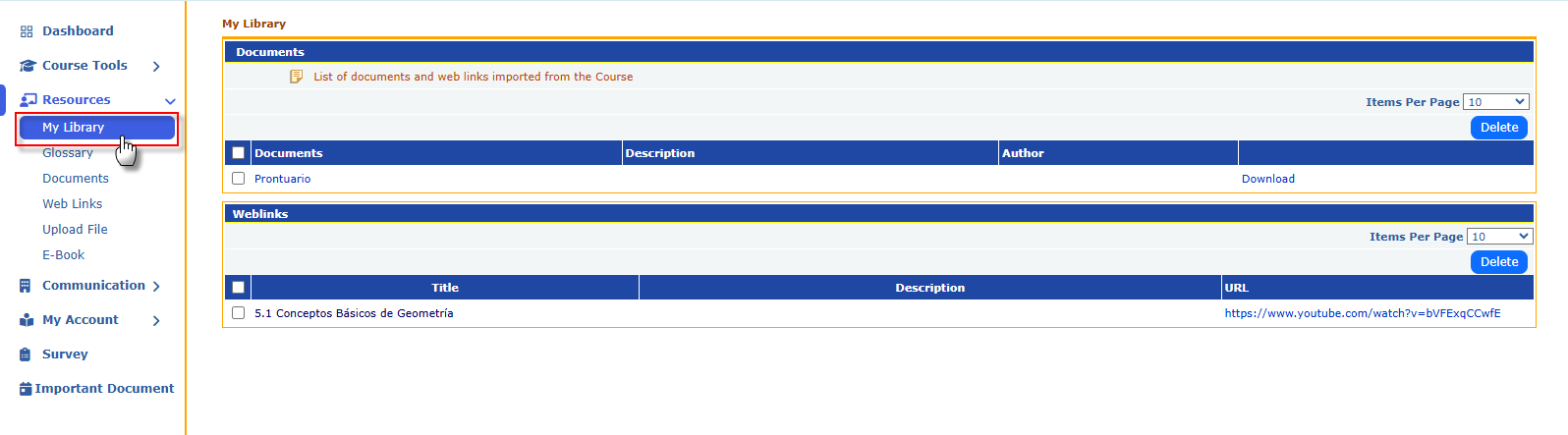
- Documents Section:
- List of Documents: This section displays all documents downloaded or imported from the course. These could include lecture notes, assignments, or reading materials.
- Description: Provides a brief overview of each document's content.
- Author: Lists who created or provided the document.
- Download Option: Students can download these documents for offline access.

- Web Links Section:
- Title: Names of helpful web resources or links related to their studies.
- Description: A summary of what each link contains or its relevance to the course.
- URL: Direct web addresses that students can click to access these resources.

- Functionality:
- Students can easily view, manage, and delete items as needed.
- It serves as a centralized repository of course-related materials, making it convenient for students to keep track of their learning resources.
This feature enhances the learning experience by providing easy access to essential documents and links.