
Import Master Section Overview
The Import Master Section feature allows instructors to import all the course materials and settings from a master section into their current course section. This functionality includes the following components:
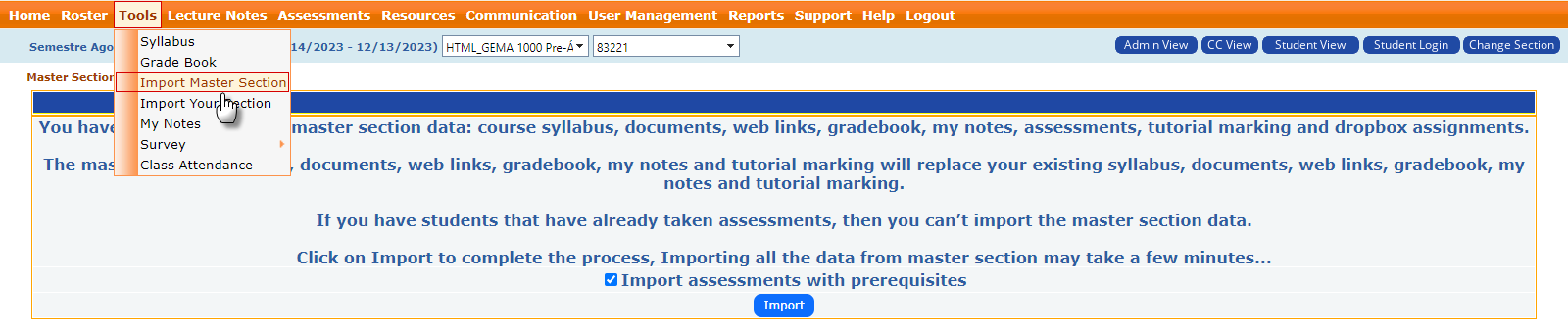
- Accessing the Tool:
- Navigate to the Tools menu.
- Select the Import Master Section option from the dropdown.
- Master Section Data:
- The system provides an option to import data such as:
- Course syllabus: The master section's syllabus will replace the existing one.
- Documents: Any documents linked to the master section will be imported.
- Web links: All web resources will be brought into the current course section.
- Gradebook: The gradebook structure, categories, and any pre-configured assessments will be imported.
- My Notes: Instructor-specific notes tied to the master section will be imported.
- Assessments: Any exams, quizzes, or assignments set up in the master section will be transferred.
- Tutorial Marking and Dropbox Assignments: These will also be included in the import.
- Import Options:
- Import Assessments with Prerequisites: There is a checkbox to choose whether assessments that have prerequisites in the master section should also be imported.
- Restrictions:
- If students have already taken assessments in the current section, importing master section data may not be possible. The existing data and assessments in the current section will be retained.
- Confirmation and Import:
- Click the Import button to proceed. The system will then import all selected components, which may take a few minutes depending on the size of the data being transferred.
This feature ensures consistency across multiple sections by allowing instructors to reuse a well-structured and previously designed course setup.